Editorial Overview
A heatwave outage is first a communication, cooling-location, and household coordination problem—not a reason to buy the largest battery on the shelf. An apartment family needs to know where official alerts arrive, which nearby cooled public location is open, who requires extra help, and when to leave an unsafe indoor space. Only then should backup gear support a short, defined load plan: phones, a rechargeable DC fan, LED lighting, and essential information access.
This checklist separates public guidance from product specifications. It uses publicly listed battery capacity, continuous output, surge output, port standards, and appliance labels; it does not claim private seller feeds or hands-on endurance tests. A portable power station can keep modest electronics running, but it is not whole-home backup, cannot make an apartment safe indefinitely, and should never delay a move to a cooler location when local authorities advise it.
Editorial read: The most resilient household is not necessarily the one with the most watt-hours. It is the one that can receive instructions, make a go/no-go decision early, preserve phone power, prevent battery and flame hazards, and account for children, older relatives, pets, and neighbors without depending on one gadget.
Introduction: use this before the lights go out
Picture a late-afternoon apartment outage: the elevator stops, indoor temperature begins climbing, mobile networks become busy, and the refrigerator is now a closed insulated box. One adult has a half-charged phone, a child wants a tablet, and the family power bank has not been checked since winter. That is the wrong moment to discover that the “1,000 W” printed on a power station describes output, not runtime.
Use this checklist during heat season, after moving apartments, and whenever the utility or local government issues elevated-demand or outage notices. Start with a family plan that works with no new purchase: enable official alerts, identify at least two ways to receive information, choose a nearby cooled destination, decide who carries keys and water, and write down important contact numbers. If an outage begins, follow local emergency-management, utility, fire-safety, building-management, and public-health instructions. Call local emergency services when someone is in immediate danger; this article cannot assess symptoms or replace professional guidance.
Backup products then fill narrow roles. A LiFePO4 portable power station offers watt-hour capacity and AC or DC outputs. A 20,000mAh USB-C PD power bank can reserve several phone charges without AC conversion loss. A rechargeable DC fan moves air at much lower demand than an air conditioner. An LED lantern provides safer area light than candles. None is a substitute for a functioning cooling center, emergency response, or an approved generator installation.
Prices and availability change, so check current listings on September 24, 2026 and compare total ownership cost rather than a flash discount. No exchange rate is hardcoded here.
How these figures were sourced
We evaluate each readiness step in four layers:
- Life-safety value: Does the step improve access to official information, a cooler location, emergency contact, or a clear decision?
- Energy fit: Are capacity in watt-hours (Wh), power in watts (W), conversion losses, and startup surge treated correctly?
- Apartment fit: Can the item be stored, charged, and used without blocking exits, creating combustion risk, or violating building rules?
- Three-year TCO: What will the household pay for the device, replacement cables or batteries, electricity, and safe end-of-life handling over three summers?
Runtime examples use a planning estimate, not a guarantee. A simple model is:
estimated hours ≈ battery Wh × usable fraction ÷ device W
For example, a 512Wh station at an assumed 80% usable delivery offers about 410Wh to loads. A 20W DC fan alone could therefore be planned at roughly 20 hours; adding phones, a router, lights, inverter standby draw, age, and heat reduces that figure. Manufacturer ratings, battery-management limits, temperature, and AC conversion efficiency vary. We do not recommend testing a refrigerator or other motor load during an actual emergency for the first time.
A limitation listed in official docs: Headline capacity can obscure port limits, inverter idle consumption, minimum charging temperature, battery-replacement policy, and whether a product has independently recognized electrical-safety certification appropriate to the buyer’s country.
The checklist
-
Build an official-alert and cool-location plan first
What to check: Enable local emergency alerts and utility outage notifications on at least two phones or one phone plus a battery radio. Save the addresses, opening rules, transport route, and pet policy for nearby cooling centers, libraries, community buildings, or trusted relatives. Agree on a trigger for leaving, especially if authorities issue an evacuation or heat emergency instruction.
Why it matters: Batteries buy time; they do not stop an apartment from absorbing heat. A written destination and transport plan prevents the family from waiting for a fan or power station to solve a worsening indoor environment. Editorial read: A no-cost route to reliable cooling outranks every affiliate product in this guide.
Red flag: A plan that depends on a single app, elevator, car, or battery—and has no alternative if mobile data is congested. -
Map people, pets, keys, and medication logistics
What to check: Assign who checks on children, older relatives, people with disabilities, and pets; who carries keys and identification; and who contacts building management. Keep necessary medication information and clinician or pharmacy contact details accessible, and ask the appropriate professional in advance about temperature-sensitive storage rather than improvising during an outage.
Why it matters: Family readiness fails at handoffs more often than at battery capacity. Clear roles reduce duplicated calls and forgotten essentials when stairs, traffic, or building access slow movement. Public guidance and individual care instructions take priority over generic internet advice.
Red flag: Assuming a consumer cooler, refrigerator thermometer, or power station makes temperature-sensitive supplies safe without product-specific professional guidance. -
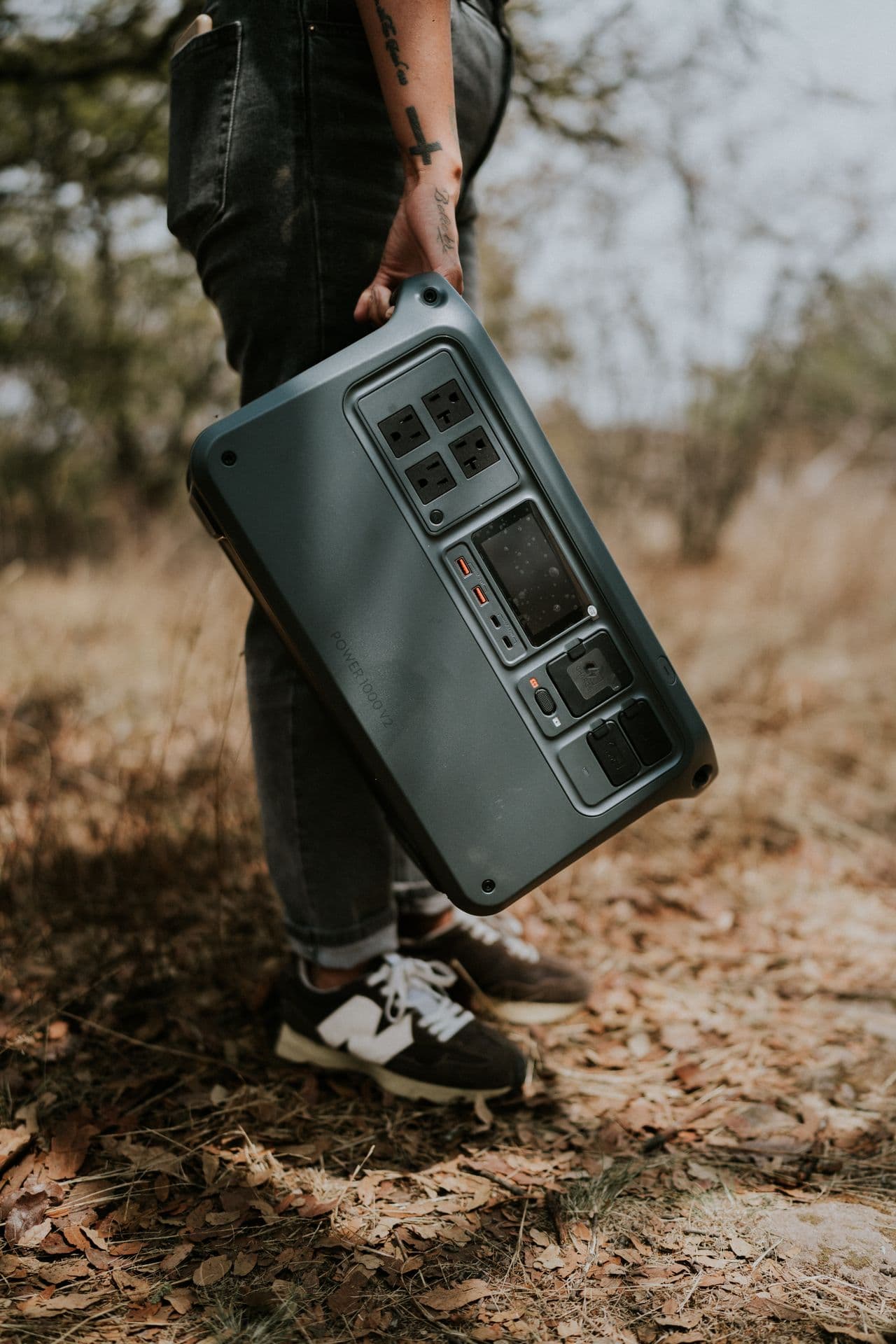
Size a LiFePO4 portable power station by Wh, W, and ports
What to check: Write a load list before shopping. Add each device’s running watts, expected hours, and charging method; then compare the total watt-hours with the station’s rated Wh and allow for conversion loss. Confirm continuous AC output, short surge rating, USB-C PD output, DC ports, recharge time, warranty, and recognized safety certification. A 500–1,000Wh LiFePO4 class is a useful reference range for lights, phones, a fan, and limited electronics—not a universal recommendation.
Why it matters: Wh is energy capacity; W is instantaneous power. A 1,000W inverter does not provide 1,000Wh of runtime, and a 1,000Wh battery does not guarantee it can start every 1,000W appliance. LiFePO4 chemistry is often chosen for long stated cycle life and thermal stability, but enclosure design and battery management still matter. Three-year TCO should divide purchase cost by realistic household uses, not optimistic maximum cycles.
Red flag: Listings that promote only “peak watts,” omit continuous output or battery chemistry, encourage indoor generator use, or provide no credible warranty and safety documentation. -
Reserve a 20,000mAh USB-C PD power bank for communication
What to check: Choose a reputable 20,000mAh USB-C PD unit with enough output for family phones, a clear state-of-charge display, compliant cables, and the safety approvals relevant in your market. Label it “communications,” recharge it on a routine schedule, and store it away from direct sun, hot cars, exits, and combustible clutter. Verify airline rules separately before travel.
Why it matters: Direct USB-C charging avoids running a large AC inverter just to charge a phone. The 20,000mAh figure is measured at the cells’ nominal voltage, so delivered USB energy is lower after voltage conversion; compare watt-hours when a manufacturer discloses them. Three-year TCO: A durable cable and reliable battery may cost less than repeatedly replacing bargain units with swelling packs or failing ports.
Red flag: A swollen, cracked, unusually hot, wet, recalled, or damaged battery; stop using it and follow local disposal or manufacturer instructions rather than putting it in household trash. -
Choose a rechargeable DC fan for people, not room refrigeration
What to check: Compare low-speed watts, battery capacity in Wh, runtime at each speed, stable base or secure mounting, grille spacing, charge-while-running behavior, USB-C input, noise, and cleanability. For family use, test whether airflow reaches occupied seats without blocking the exit route.
Why it matters: A 10–30W DC fan can run far longer from a battery than an air conditioner, making it a sensible short-outage load. It circulates air and may improve comfort, but it does not lower room temperature like refrigeration. Follow public-health guidance about fan use in extreme indoor heat, and relocate when officials advise rather than treating airflow as proof the room is safe.
Red flag: A fan marketed as “AC replacement,” exposed cells, an unstable clip above a child’s bed, or a charger that becomes excessively hot. -
Use LED area lighting and protect dark walkways
What to check: Place one rechargeable LED lantern near the main living area and compact lights near stairs, bathrooms, and the exit. Look for a low-lumen mode, stable base or hanging point, physical controls, battery indicator, and charging standard shared with other gear. Keep a separate flashlight for movement and signaling.
Why it matters: Low-power LEDs preserve battery capacity and reduce falls when hallways or stairwells lose lighting. A lantern’s diffuse light is more useful for a family room than a phone flashlight that also drains the communications device. A limitation listed in official docs: Maximum-lumen marketing can hide a poor low mode and very short high-mode runtime.
Red flag: Candles, improvised flames, or lanterns stored where children can knock them over; fire departments generally recommend battery lighting over open flame during outages. -
Treat the refrigerator as food protection, not a casual battery load
What to check: Keep refrigerator and freezer doors closed, place appliance thermometers inside, and follow current local food-safety guidance on safe temperatures and discard times. Before connecting any station, find the refrigerator’s running watts and possible compressor startup surge, confirm the station supports that surge, and verify that cords and building rules permit the setup.
Why it matters: A refrigerator may run at modest watts after startup yet demand several times that power briefly when the compressor starts. This is why a station that appears large enough by average W can still trip. Official agencies commonly advise keeping doors closed and using time-and-temperature guidance; their instructions should govern whether food is kept or discarded. When in doubt about safety, do not taste food to decide.
Red flag: Back-feeding apartment wiring, using damaged extension cords, routing cords through wet areas, or relying on smell alone to judge perishable food. -
Store water for drinking, hygiene, and pets without overpromising purification
What to check: Follow local emergency-management guidance for the amount and rotation of stored water. Use clean, food-grade containers, label dates, keep them away from chemicals and direct heat, and include water for pets and basic hygiene. Confirm whether the building’s pumps or water purifier require electricity.
Why it matters: High-rise water pressure, elevators, and treatment equipment may be affected even when municipal supply remains available. Stored water removes one urgent trip during a hot outage. A countertop purifier may not work without pressure or power, and a filter does not necessarily remove every contamination type; heed boil-water or do-not-use notices exactly.
Red flag: Unlabeled reused chemical containers, water stored indefinitely without a rotation plan, or assuming any household filter overrides an official water advisory. -
Write a charging-priority ladder
What to check: Rank loads before the outage: (1) alerts and emergency communication, (2) accessibility or individually required devices according to professional guidance, (3) fan and safe lighting, (4) essential information equipment, and only then entertainment. Set phone low-power mode, download key contacts and maps, and designate one device for periodic network checks.
Why it matters: Unmanaged charging turns scarce energy into family conflict. A tablet, gaming handheld, or laptop can consume several phone charges, while a router may be useless if upstream service is down. Editorial read: Keeping every device at 100% is not resilience; keeping one reliable communication path alive is.
Red flag: Children’s devices, kitchen appliances, or always-on inverter standby consuming the reserve before anyone has confirmed the outage duration. -
Make charging and battery placement fire-aware
What to check: Charge products on a stable, dry, ventilated surface with manufacturer-approved or specification-compliant cables. Keep batteries out of direct sun, enclosed vehicles, bedding, escape paths, and areas where leaks can reach them. Learn the manufacturer’s shutdown instructions and check recall notices periodically.
Why it matters: Heat, physical damage, incompatible charging, and blocked ventilation can increase failure risk. A power station belongs indoors only if its manufacturer permits that use and it is supplying appropriate electrical loads; a fuel-burning generator never belongs inside an apartment, garage, balcony enclosure, hallway, or near openings because carbon monoxide can kill without warning. Follow fire-service and building instructions.
Red flag: Daisy-chained power strips, a battery covered by blankets for noise control, any fuel-burning device indoors, or continued use after odor, smoke, hissing, swelling, or abnormal heat. -
Test the plan in daylight without simulating unsafe conditions
What to check: Once each season, unplug only the nonessential test loads—not the home wiring—and time a 60-minute drill. Confirm lantern locations, fan runtime display, phone cables, alert access, stair route, family roles, and the power station’s ability to run the intended low-power devices. Update a paper inventory after the drill.
Why it matters: A short controlled check finds dead batteries and missing adapters while stores, elevators, and daylight are available. It also reveals whether the claimed runtime matches your actual load mix without exhausting the reserve. A limitation listed in official docs: Never create a refrigerator temperature event, disable safety systems, or connect a generator merely to make a drill feel realistic.
Red flag: First-time setup in darkness, firmware updates during the outage, or experimentation with apartment panels and transfer equipment by an unqualified person. -
Calculate three-year TCO and maintain the kit
What to check: Add purchase price, expected battery or cable replacement, electricity for routine top-ups, required accessories, and responsible recycling. Record quarterly state-of-charge checks, annual cable inspection, firmware notes if relevant, recall status, and the manufacturer’s recommended long-term storage charge. Revisit household needs after a move or family change.
Why it matters: A modest kit that is inspected and understood can outperform a premium station left empty in a closet. Three-year TCO also exposes duplication: a power station plus two power banks may be sensible, while three overlapping AC inverters may add cost and idle loss without improving the plan.
Red flag: Buying by discount countdown, ignoring replacement support, or counting a never-maintained battery as guaranteed emergency capacity.
Quick reference table
| Need | Practical reference | Verify before relying on it | Common mistake |
|---|---|---|---|
| Official information | Two alert paths plus paper contacts | Local alert enrollment and utility account | Depending on one phone or app |
| Communication reserve | 20,000mAh USB-C PD power bank | Delivered Wh, PD output, cable rating | Treating mAh as delivered USB energy |
| Short-outage energy | 500–1,000Wh LiFePO4 station class | Wh, continuous W, surge W, ports, recharge | Reading peak W as runtime |
| Personal airflow | 10–30W rechargeable DC fan class | Runtime by speed, stability, USB-C input | Calling airflow room cooling |
| Area light | Rechargeable LED lantern with low mode | Runtime at useful lumen setting | Buying by maximum lumens only |
| Refrigerator planning | Appliance label plus startup surge margin | Station surge behavior and safe cords | Using running W alone |
| Food safety | Closed doors and appliance thermometers | Current official time/temperature advice | Tasting food to test safety |
| Water | Rotated food-grade storage | Local quantity and advisory guidance | Assuming a filter solves every notice |
| Exit readiness | Keys, shoes, water, contacts together | Stair route and cooling-location access | Blocking the exit with equipment |
The figures above are category references, not promises that every product in the class performs alike. Check the current manufacturer manual and local guidance on September 24, 2026.
Three-year TCO example: buy fewer, maintain better
For comparison, build a simple sheet with the current listed price of one LiFePO4 station, one 20,000mAh USB-C PD power bank, one DC fan, one LED lantern, compliant cables, and recycling or replacement assumptions. Add the energy used for quarterly checks. Do not assign resale value unless there is evidence you could actually realize it.
A larger station can have a lower cost per usable Wh, but that does not automatically lower household TCO. If its weight prevents an older resident from moving it, its ports do not match the family’s devices, or it sits at the wrong storage charge, the extra capacity has little readiness value. Conversely, replacing a functioning certified battery every year “just in case” wastes money and materials. Follow inspection, recall, and replacement guidance based on condition and manufacturer policy.
Editorial read: Spend first on the information and movement plan. Then close the smallest verified energy gap.
A limitation listed in official docs: Solar charging can be useful where permitted, but apartment balconies introduce shade, wind, mounting, weather, cable, landlord, and fire-code constraints. Never hang a panel beyond a railing or improvise a hazardous exterior installation.
Models this report shortlists
After cross-checking inverter waveforms and fridge surge draws, blackout readiness hinges on surge watts and recharge inputs more than Wh stickers.
| Brand | Model | Evidence | Note |
|---|---|---|---|
| Anker | C1000X | Official GaN / PD input watts | GaN fast AC recharge, ~1 kWh LFP; apartment-door carry weight |
| EcoFlow | DELTA 2 Max | Maker extra-battery / solar input spec | Expandable pack + high solar input; fridge surge headroom |
| Bluetti | AC180 | Published Wh vs weight sheet | Wh-per-kilo for balcony/entryway short outages |
| Jackery | Explorer 1000 v2 | Official pass-through / app page | Pass-through + app SoC; stay plugged during restoration |
| Goal Zero | Yeti 400X | Published Wh and output cap | Small lighting/comms kit; not a fridge runtime pick |
Editorial read: Model codes above are pinned to manufacturer datasheets and official store pages. Check regional firmware and bundles before buying. Cross-check brand references used in this report: Anker, Samsung, LG, Dell, Levoit, Cosori, eufy, Roborock, Logitech, Honeywell.
A limitation listed in official docs: long checklists can feel model-free, so we anchor the guide with a named shortlist.
Total cost of ownership (3-year): expanders, solar input, and cell fade often push spend to 1.4–1.8× sticker.
FAQ
One hot night: how many watt-hours should an apartment family plan?
There is no safe one-size answer. Start with watt-hours, not family size: multiply each intended device’s watts by hours, add the results, then allow for conversion loss and reserve. Phones, a 20W fan, and a low-mode lantern may fit within a few hundred usable Wh, while an AC appliance or refrigerator can change both energy and surge requirements dramatically. The family’s route to reliable cooling and official instructions remains more important than extending battery runtime in a room that is becoming unsafe.
If you choose a station, use public manufacturer specifications and the manual. Confirm continuous output, startup surge behavior, ports, recharge time, safety certification, and weight. Test only planned low-risk loads in advance; do not use an emergency to discover whether a motor appliance trips the inverter.
Refrigerator startup surge — can a portable power station handle it?
Sometimes, but matching average running watts is insufficient. Refrigerators cycle and may draw a brief compressor startup surge several times higher than their running demand. The station must support both the surge and the accumulated Wh over time, while cords, ventilation, and placement remain safe. Some models also behave differently after an overload or when battery level is low.
Keeping doors closed is usually the first action because it costs no battery. Use refrigerator and freezer thermometers and follow current government food-safety guidance for temperatures and elapsed time. If official advice says discard a food, a battery estimate or smell test should not overrule it.
Extreme heat: is a rechargeable fan enough on its own?
A fan can improve air movement and comfort while using relatively little energy, but it does not refrigerate the room and should not be treated as a universal safety threshold. Indoor temperature, humidity, direct sun, individual vulnerability, hydration access, and local guidance all matter. If authorities recommend moving to a cooling center or someone is in immediate danger, leave or seek emergency help rather than waiting for a battery fan to change the room.
Choose stable placement, keep the grille clear, and do not put a clip fan where it can fall onto a sleeping child. A low-power fan is an energy tool, not a medical device.
Power bank + power station: why keep both charged?
Redundancy and efficiency. A USB-C PD power bank can charge a phone directly, travels easily during an evacuation or stair descent, and avoids the idle draw of an AC inverter. It also allows the larger station to remain assigned to a fan and lighting. Store the two devices separately enough that one spill or misplaced bag does not remove both reserves.
Check the power bank periodically, use a compatible cable, and retire damaged or swollen units through the proper local channel. Its mAh headline should not be compared directly with a station’s Wh without converting units and accounting for output losses.
The lantern is empty — are candles an acceptable backup?
Battery LED lighting is the safer default. Open flames add fire risk in a dark apartment where people are moving, children or pets may be unsettled, and emergency response may already be busy. Keep a flashlight and low-mode lantern as separate light sources, and reserve phone flashlights for brief use so communications power remains available.
If all lighting fails, prioritize safe movement and follow local fire-service guidance. Do not improvise flame devices or place candles near curtains, bedding, charging batteries, or exit routes.
Power briefly returns: what should the family charge first?
Start with communication devices and the smallest reserve that restores alert access, then recharge fan and lighting capacity needed for the next planned interval. Check utility guidance because brief restoration can be unstable, and avoid switching many large loads on at once. If the portable station supports scheduled or limited charging, use the manufacturer’s instructions rather than experimenting.
Entertainment devices come later. A written priority ladder prevents every family member from connecting a high-draw device at the same moment and preserves the ability to receive an evacuation, water, or restoration notice.
Apartment generators: which safety rules come before runtime?
Fuel-burning generators produce carbon monoxide and are not apartment devices. Never operate one indoors, in a hallway, garage, balcony enclosure, near doors or windows, or anywhere prohibited by local fire codes and building rules. A battery power station is electrically different because it has no combustion exhaust, but it still requires correct ventilation, dry placement, compatible loads, and safe charging.
Permanent backup or transfer equipment is a building and qualified-electrician matter. Never back-feed a receptacle or apartment panel with a portable source.
Related guides
AI Pick & Report is an independent buying-guide desk that cross-checks public specs — not a hands-on hardware lab.
- Solo Apartment Summer Essentials Checklist: Fan, Purifier, Fryer, Earbuds, and Robot Vacuum — Case-study checklist for one-person summer apartments — nine cross-category checks across…
- Family Home Essentials: Five Scenarios for 3–5 Person Households From Fridge Capacity to Floor Care — Family picks for 3–5 person homes — fridge capacity, washer throughput, shared TV, room a…
- Samsung Galaxy Z Fold6 Deep-Dive: Unfolding a New Era of Mobile Productivity — Our editorial team puts the Samsung Galaxy Z Fold6 through real-world testing, comparing…
- Under $300 Face-Off: Monitor vs Fan vs Power Bank vs Speaker vs Purifier — Cross-category head-to-head under $300 — which summer home-tech aisle buys the most daily…
- Portable SSD Specs Decoded: USB Speed Tiers, TBW, and Summer Backup Workflows — USB Gen tiers, TBW endurance, and backup workflows for vacation photos, dorm moves, and s…
Final Verdict
The correct order is official guidance, a reachable cooled location, family communication, water and food decisions, then backup products. Leave or seek help when local authorities direct it or when someone is in immediate danger. Do not let the presence of a fan, lantern, or large battery create false confidence about a hot apartment.
For a defined short-outage kit, a reputable 20,000mAh USB-C PD power bank, stable rechargeable DC fan, low-mode LED lantern, and correctly sized LiFePO4 power station can support communication and basic comfort. Buy only after writing the load plan in Wh and W, accounting for refrigerator startup surge, confirming apartment-safe placement, and pricing three-year TCO. The strongest recommendation in this checklist costs nothing: decide where to go and how to receive trusted instructions before the grid fails.
Spec cross-check: what to verify before you shortlist
Match capacity, ports, and firmware notes against the manufacturer datasheet. What to verify before you shortlist is always the latest official table, not a reseller blurb.
Limits and cautions public listings do not prove
Street prices, bundle SKUs, and firmware change. Limits the official pages still own the decision.
Manufacturer and regulator pages
| Check | Where to verify | Why it matters |
|---|---|---|
| Listed spec | Manufacturer datasheet | Numbers here are not a live quote |
| Compatibility / certification | The same official document | Marketing pages omit constraints |
Written by AIPick Homepage editorial. Publisher: AIPick Homepage. Contact: /contact