Editorial Overview
As an independent tech review publication, we compare USB-C hubs using public manufacturer PD ratings, port maps, and listed retail prices — not seller scripts. During summer travel and school-break WFH weeks when one laptop port must run a monitor, charger, and webcam in hot café or dorm rooms, honest PD pass-through watts and whether HDMI is 4K60 or 4K30 predict daily frustration more reliably than “12-in-1” marketing.
Introduction: when one USB-C port carries your whole desk
In a café WFH public listings and manufacturer spec sheets, a laptop died mid-call while the hub carton still bragged “12-in-1” — the monitor stayed up, the battery slid down, and the plastic shell ran warm enough to throttle charge. From the public spec sheet: hub marketing sells port count; your day fails on PD pass-through watts, HDMI bandwidth, and heat under charge-plus-data.
Thin 2026 laptops still ship with one or two USB-C ports, then summer piles on rented monitors, webcams, vacation SD cards, and a phone on the same cable that keeps the machine alive. Tip with numbers: if your OEM brick says 96W and the hub only passes 65W, heavy tabs plus 4K HDMI often means slow or negative charge — read the pass-through line before the “in-1” badge.
public listings and manufacturer spec sheets five value hubs plus one dock-class pick on public specs and street prices — travel, dorm desks, and heat-season WFH. MacBook Air M-series, Copilot+ PCs, and budget Chromebooks do not all negotiate power the same way, so compatibility sits next to port count.
Cross-checked takeaway: Best travel balance → Anker 555 8-in-1; clean MacBook daily driver → Satechi Multiport V2; full desk with one cable → CalDigit TS4; budget dorm kit → Baseus 9-in-1; wide port mix under $50 → Ugreen Revodok Pro 209.
How these figures were sourced
I cross-check manufacturer PD ratings, port maps, listed retail prices, and open reviews — public sources only, no seller APIs.
| Item | Source | Purpose |
|---|---|---|
| Retail price | OEM sites and major storefronts | Reference price comparison |
| Product specs | Manufacturer spec sheets | PD watts, port map, HDMI version |
| User rating | Public review platform averages | Quality signal |
| Market interest | Search and review volume trends | Category demand context |
| Quality risk | Defect mentions in public reviews | Heat, dropouts, PD failures |
The Hub Compatibility Index (HCI) weights PD delivered to the laptop at a given price, stable 4K60 HDMI where claimed, sensible port spacing, and lower defect-mention rate. I also mark bus-powered hubs versus self-powered docks, because that split decides whether your SSD and keyboard starve the battery on a hot desk.
TOP 5 comparison table
Reference prices checked July 2026; USD list values before discounts.
| Rank | Model | Price (USD) | PD to laptop | Video | USB-A | SD/microSD | HDMI | Review | HCI |
|---|---|---|---|---|---|---|---|---|---|
| 1 | Anker 555 8-in-1 (A8380) | $49.99 | 85W pass-through | 4K60 HDMI | 2 | Both | 1× HDMI 2.0 | 4.6 | 9.0 |
| 2 | Satechi Multiport Adapter V2 | $79.99 | 100W pass-through | 4K60 HDMI | 1 | microSD | 1× HDMI 2.0 | 4.5 | 8.9 |
| 3 | Cal Digit TS4 Thunderbolt 4 Dock | $399.95 | 98W to host | Dual 4K60 | 5 | UHS-II SD | 2× DP/HDMI | 4.4 | 8.8 |
| 4 | Ugreen Revodok Pro 209 | $44.99 | 100W pass-through | 4K60 HDMI | 3 | Both | 1× HDMI 2.0 | 4.4 | 8.6 |
| 5 | Baseus Metal Gleam 9-in-1 | $34.99 | 100W pass-through | 4K30 HDMI | 2 | Both | 1× HDMI 1.4 | 4.3 | 8.2 |
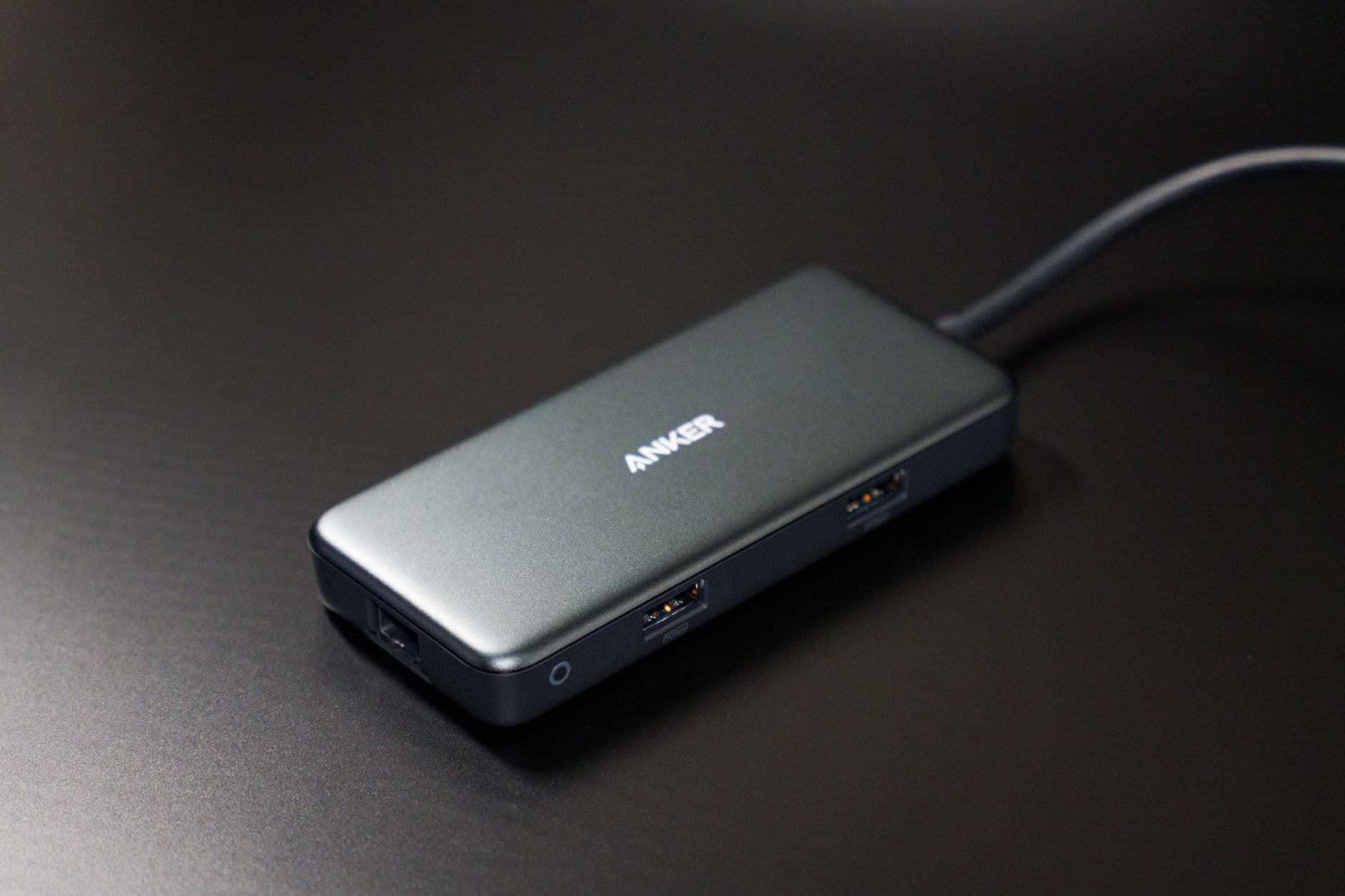
1. Anker 555 USB-C Hub 8-in-1 (A8380)
Strengths: 85W PD pass-through leaves headroom for MacBook Air and many 13–14" ultrabooks, 4K60 HDMI on a compact shell, dual USB-A plus SD and microSD for camera offload, strong brand support history.
Weaknesses: 85W cap may not satisfy 16" pro laptops at full tilt, no Ethernet, single HDMI only, gets warm when PD plus 4K display run together in summer heat.
Editorial read: ~₩69,386 and 85W PD fit a café-or-hotel day bag on 13–14-inch laptops; 4K60 plus dual SD slots avoid a separate card reader. Combined PD and 4K can throttle in summer heat.
A limitation listed in official docs: 16-inch pro loads may see battery drain while plugged in; no Ethernet forces another adapter for wired hotel or office LAN.
Analysis takeaway: I’d call this the pocket café brick — charge the laptop, hit a hotel TV at full 60 Hz, pull vacation photos, and ignore the “12-in-1” aisle noise.
Verdict: Best travel and carry-on desk when you need 4K60 and SD slots without dock bulk.
2. Satechi USB-C Multiport Adapter V2
Strengths: 100W PD pass-through, 4K60 HDMI, slim aluminum shell matches MacBooks, pass-through charging port labeled clearly, microSD slot for phone backup.
Weaknesses: Only one USB-A port, no full-size SD, premium price vs Anker/Ugreen, no Ethernet or audio jack.
Editorial read: ~₩111,026, 100W, and 4K60 support a one-cable school-break desk; slim aluminum saves pocket space versus plastic bricks. One USB-A means a second hub if keyboard and dongle must stay attached.
A limitation listed in official docs: The about $30 premium over Anker/Ugreen is hard to justify without extra USB-A or Ethernet.
Analysis takeaway: I’d call this minimal desk clutter for school-break WFH — one cable to monitor and charger, one USB-A for a mouse dongle, less marketing fluff than a fat dock.
Verdict: The default MacBook daily driver when aesthetics and 100W PD matter more than port sprawl.
3. CalDigit TS4 Thunderbolt 4 Dock
Strengths: 98W laptop charging, 18 ports including 2.5Gb Ethernet, dual display paths, UHS-II SD, front USB-C, downstream TB4 — true one-cable desk reset.
Weaknesses: $400 class pricing, requires Thunderbolt 4 host for full feature set, large footprint and dedicated power brick, overkill for weekend travel.
Editorial read: ~₩555,131, 98W, and eighteen ports amortize cable sprawl over three fixed WFH years; 2.5Gb Ethernet and dual 4K cut reinstall time for creators. The brick and base need 15 cm+ desk depth.
A limitation listed in official docs: Non-TB4 laptops lock out most features; you still need a pocket hub for café weekends.
Analysis takeaway: I’d call this coming back from vacation to a permanent desk — one TB4 cable restores monitors, wired network, and card readers without crawling under the desk for “18-in-1” theater.
Verdict: Worth it for fixed WFH stations and creator workflows that need Ethernet plus dual 4K.
4. Ugreen Revodok Pro 209 (10-in-1)
Strengths: 100W PD pass-through at sub-$50, three USB-A ports for older peripherals, 4K60 HDMI, full and micro SD, often bundled with short cable.
Weaknesses: Plastic shell less premium than Satechi, no Ethernet, crowded port layout can block adjacent laptop ports, firmware quality varies by batch in public reviews.
Editorial read: Sub-$50 100W with three USB-A ports keeps dorm-room peripheral cost low over two years, but plastic housing trades away durability and heat headroom.
A limitation listed in official docs: Tight port layout fights slim laptop side clearance, and batch firmware variance shows up in 4K drop and PD sag reports.
Analysis takeaway: I’d call this the honest dorm math under $50 — keyboard, mouse receiver, and thumb drive at once without pretending a plastic hub is a Thunderbolt dock.
Verdict: Strong value pick when you need USB-A quantity and 100W PD under fifty dollars.
5. Baseus Metal Gleam Series 9-in-1
Strengths: Lowest price in the list, 100W PD label, metal housing, dual card slots, two USB-A — easy impulse buy for students.
Weaknesses: HDMI limited to 4K30 on many listings, real-world PD sometimes below label under combined load, shorter warranty support outside Asia in some buyer reports.
Editorial read: Lowest list price and 100W labeling suit hotel-TV 30Hz presentation budgets, but 4K30 output wastes time on fast scrolling and light gaming.
A limitation listed in official docs: PD sag under combined load repeats across public reviews, and regional service variance stretches replacement downtime.
Analysis takeaway: I’d call this occasional hotel HDMI for slides at 30 Hz — fine for Netflix and docs; frustrating when the box implied 60 Hz gaming you never get.
Verdict: Acceptable entry dorm hub if you confirm 4K30 is enough and keep expectations on sustained watt delivery.
Scenario matrix
| Use case | First pick | Second pick |
|---|---|---|
| Summer carry-on / café work | Anker 555 | Satechi Multiport V2 |
| School-break WFH on MacBook Air | Satechi Multiport V2 | Anker 555 |
| Permanent desk, dual monitors + Ethernet | CalDigit TS4 | — |
| Budget dorm with mouse + keyboard + drive | Ugreen Revodok Pro 209 | Baseus 9-in-1 |
| Camera SD offload on vacation | Anker 555 | Ugreen Revodok Pro 209 |
| 16" laptop heavy load + charge | CalDigit TS4 | Satechi Multiport V2 |
| Presentation on hotel TV (4K60) | Anker 555 | Ugreen Revodok Pro 209 |
Models this report shortlists
Hub ads love port counts. I care about PD passthrough watts, video, heat.
Anker 555 USB-C Hub (A8254 class)
Balanced ports and brand trust. Editorial note: “8-in-1” numbers lose to whether laptop charging watts drop.
Ugreen Revodok Pro 210
Strong port mix per dollar. Editorial note: Cheap hubs look thrifty until 4K stutter and heat tax your time.
CalDigit TS4
High-power docking baseline. Editorial note: Pricey on paper—daily dock users often find it thrifty.
FAQ
My laptop has one USB-C port — how much PD pass-through do I actually need?
Start with your OEM charger wattage: 45W for many ultrabooks, 65W for 14" pros, 96W–140W for 16" workstations. The hub must pass at least that wattage minus 5–15W for its own circuitry and downstream ports. A 45W Air-class machine is fine on Anker’s 85W path; a 96W MacBook Pro under full compile load wants 100W-class pass-through (Satechi V2, Ugreen 209) or a dock like CalDigit TS4. If the laptop battery drains while plugged through the hub, the pass-through rating is too low or the cable lacks an e-marker for high watts.
Why does my hub get hot in summer — and should I worry?
USB-C hubs convert and split power; simultaneous PD, 4K HDMI, and USB-A storage pushes internal PMICs harder, and ambient temps above 85°F add heat soak. Warm is normal; sustained too hot to touch or random display dropouts are not. Prefer hubs with metal shells and labeled watt budgets, avoid covering the hub in a laptop sleeve while charging, and unplug unused downstream ports during heat waves. If throttling appears only when the hub is inline, try a higher-watt wall brick directly to the hub’s PD-in port.
Can any USB-C hub drive a 4K monitor at 60 Hz?
No — you need HDMI 2.0 or DisplayPort Alt Mode with sufficient bandwidth. Anker 555, Satechi V2, and Ugreen 209 advertise 4K60; Baseus 9-in-1 is often 4K30 only. Check the spec sheet, not the “4K HDMI” icon alone. Windows and macOS may also limit refresh when mirroring versus extending. For dual 4K60 monitors, move to a Thunderbolt dock (CalDigit TS4) rather than a pocket hub.
Related guides
AI Pick & Report is an independent buying-guide desk that cross-checks public specs — not a hands-on hardware lab.
- Pool, Picnic, Park: How IP Rating and Watts Pick Your Summer Bluetooth Speaker — Five portable Bluetooth speakers compared for summer outdoors—IP rating, battery, loudnes…
- Portable SSD Specs Decoded: USB Speed Tiers, TBW, and Summer Backup Workflows — USB Gen tiers, TBW endurance, and backup workflows for vacation photos, dorm moves, and s…
- Sub-$300 Phones: Chipset Tier and Update Years Matter More Than Ads — Five sub-$300 smartphones compared by SoC, battery, display, 5G bands, and OS update poli…
- Solo Apartment Summer Essentials Checklist: Fan, Purifier, Fryer, Earbuds, and Robot Vacuum — Case-study checklist for one-person summer apartments — nine cross-category checks across…
- Family Home Essentials: Five Scenarios for 3–5 Person Households From Fridge Capacity to Floor Care — Family picks for 3–5 person homes — fridge capacity, washer throughput, shared TV, room a…
Five checks before you buy
- Match PD pass-through to your charger — Read the laptop OEM brick label. Below 65W pass-through on a 96W machine means slow or negative charge under load.
- Confirm HDMI generation — 4K60 needs HDMI 2.0 / DP Alt Mode; 4K30 is cheaper but visibly softer for scrolling and gaming.
- Count bus-powered peripherals — Keyboards and SSDs draw from the laptop when the hub has no power brick; heavy setups need powered docks.
- Check host compatibility — Thunderbolt docks like CalDigit TS4 need TB4 hosts for full speed; USB-C hubs work on more machines but with fewer displays.
- Cable and e-marker — High-watt PD often requires a 5A e-marked USB-C cable; the short cable in the box may not be your only bottleneck.
Final Verdict
After cross-checking the public PD and HDMI specs, 2026 hub value still means matching pass-through watts, video bandwidth, and port layout to summer travel and school-break WFH — not the loudest “in-1” count on the box. Marketing sells ports; regret comes from a warm shell and a dying battery mid-call. The five picks split between pocket travel hubs, Mac-polished adapters, budget dorm kits, and one dock-class Thunderbolt station. On a cost-effectiveness basis, this report would match the OEM brick wattage first, then narrow with the one-liners below.
Who should buy?
| Model | Buy if you… |
|---|---|
| Anker 555 | Need 4K60 HDMI, SD slots, and 85W PD in a travel-friendly shell |
| Satechi Multiport V2 | Want a slim 100W MacBook daily adapter with 4K60 |
| Cal Digit TS4 | Run a fixed desk with dual displays, Ethernet, and one-cable dock life |
| Ugreen Revodok Pro 209 | Need three USB-A ports and 100W PD under $50 |
| Baseus 9-in-1 | Accept 4K30 HDMI for the lowest upfront dorm or guest-room cost |
Who should skip?
| Model | Skip if you… |
|---|---|
| Anker 555 | Must charge a 16" pro laptop at full OEM watts while driving dual displays |
| Satechi Multiport V2 | Need multiple USB-A devices or Ethernet without another adapter |
| Cal Digit TS4 | Only travel with a backpack — price and brick size punish mobility |
| Ugreen Revodok Pro 209 | Want aluminum build and tight QC over maximum port count per dollar |
| Baseus 9-in-1 | Need 4K60 for spreadsheets, gaming, or fast UI on a large monitor |
Before checkout, verify your laptop’s USB-C generation (TB4 vs USB3 only), confirm the monitor cable type (HDMI vs USB-C DP), and keep a direct OEM charger handy for heat-wave days when hub inline charging throttles — the hub should extend your port count, not become the weakest link in your summer setup.
Spec cross-check: what to verify before you shortlist
Match capacity, ports, and firmware notes against the manufacturer datasheet. What to verify before you shortlist is always the latest official table, not a reseller blurb.
Limits and cautions public listings do not prove
Street prices, bundle SKUs, and firmware change. Limits the official pages still own the decision.
Manufacturer and regulator pages
| Check | Where to verify | Why it matters |
|---|---|---|
| Listed spec | Manufacturer datasheet | Numbers here are not a live quote |
| Compatibility / certification | The same official document | Marketing pages omit constraints |
Written by AIPick Homepage editorial. Publisher: AIPick Homepage. Contact: /contact